Contact Form
The Contact Form Block allows you to easily add a simple, user-friendly contact form to any page on your site. This gives visitors a direct way to get in touch with the appropriate office or department without navigating to a separate contact page.
Prior to the introduction of this block, the only way to offer a contact form was by creating a dedicated page titled /contact. The updated block now provides increased flexibility, enabling admin users to place a contact form where it makes the most sense within their content. However, because contact forms can interrupt the flow of a page or lead to overuse, they should be used sparingly and only in locations where they are clearly beneficial to users.
When To Use This Component
USE CASES OR SCENARIOS
- Visitors may reasonably need to reach out regarding the specific content on the page.
- A department or office wants to provide quick access to a simple inquiry form without requiring users to navigate away.
- The contact form enhances the user experience by reducing steps and supporting task completion.
- The page serves a focused purpose where user questions are likely (e.g., requesting information or asking for assistance).
Avoid using the contact form on pages where a general “Contact Us” link or departmental email would be more appropriate. Overuse can clutter the site and may lead to inquiries being sent to the wrong place.
Component Do’s and Don’ts
DO
Use the block only in meaningful locations where a form genuinely improves usability and supports user needs, and ensure that all submissions are routed to an actively monitored email address so users receive timely responses. Place the form near the bottom or end of the page, after providing enough context for visitors to determine whether they need to contact you, and always test the form after publishing to confirm that submissions are being delivered correctly.
DON’T
Don’t place a contact form on every page, as this can overwhelm users and dilute the purpose of the block, and don’t add a form if a simple email link or departmental contact page would be more appropriate. The block should not be used as a replacement for main site-wide contact resources, especially when inquiries need to go through established channels. Avoid requesting sensitive or unnecessary personal information, keeping fields strictly relevant, and always maintain the connected inbox, as outdated or unmonitored email addresses can lead to user frustration.
How To Use This Component
- When in Admin mode, click Site Options in the top-left corner of the menu.
- Next, select Contact Form.
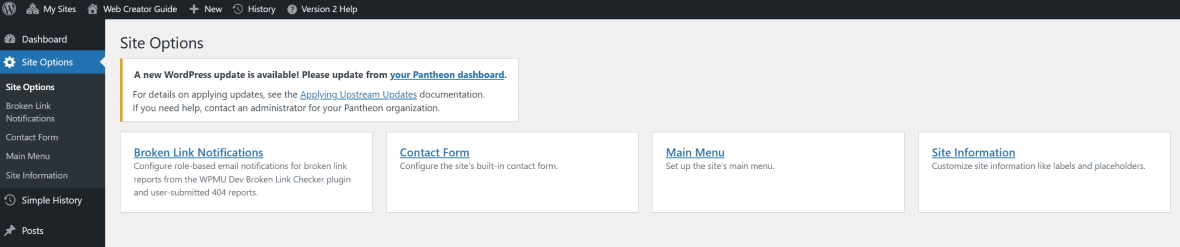
- Click Add Group and create a group name (for example: Web Services, Department of Agriculture, Student Advising, etc.).
- Then click Add Email to associate an email address with the group name.
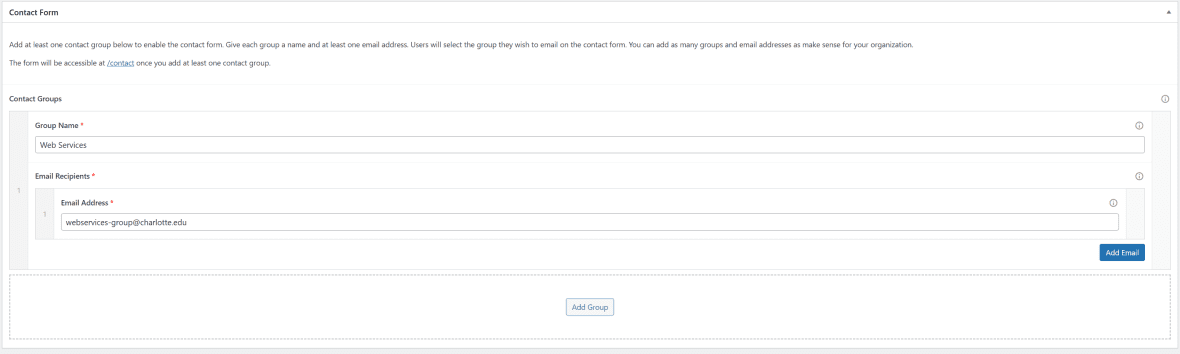
- You can create multiple groups as needed. NOTE: If multiple groups are added, all groups will appear on the contact form, and users will need to select the appropriate group when submitting a message. It is highly recommended to provide brief instructions above the form so users know which group to choose. See the example below for guidance.
Select Contact Groups:
- Web Services: For Central Web Services IT inquiries
- Media Relations: For media inquiries during weekends or holidays
- Social Media: If you have questions or would like a recommendation on your social media presence
Confidential or sensitive data, or data that is personally identifiable should never be collected or stored on publicly available websites. See supporting documentation for University Policy 311 – Guideline for Data Handling.