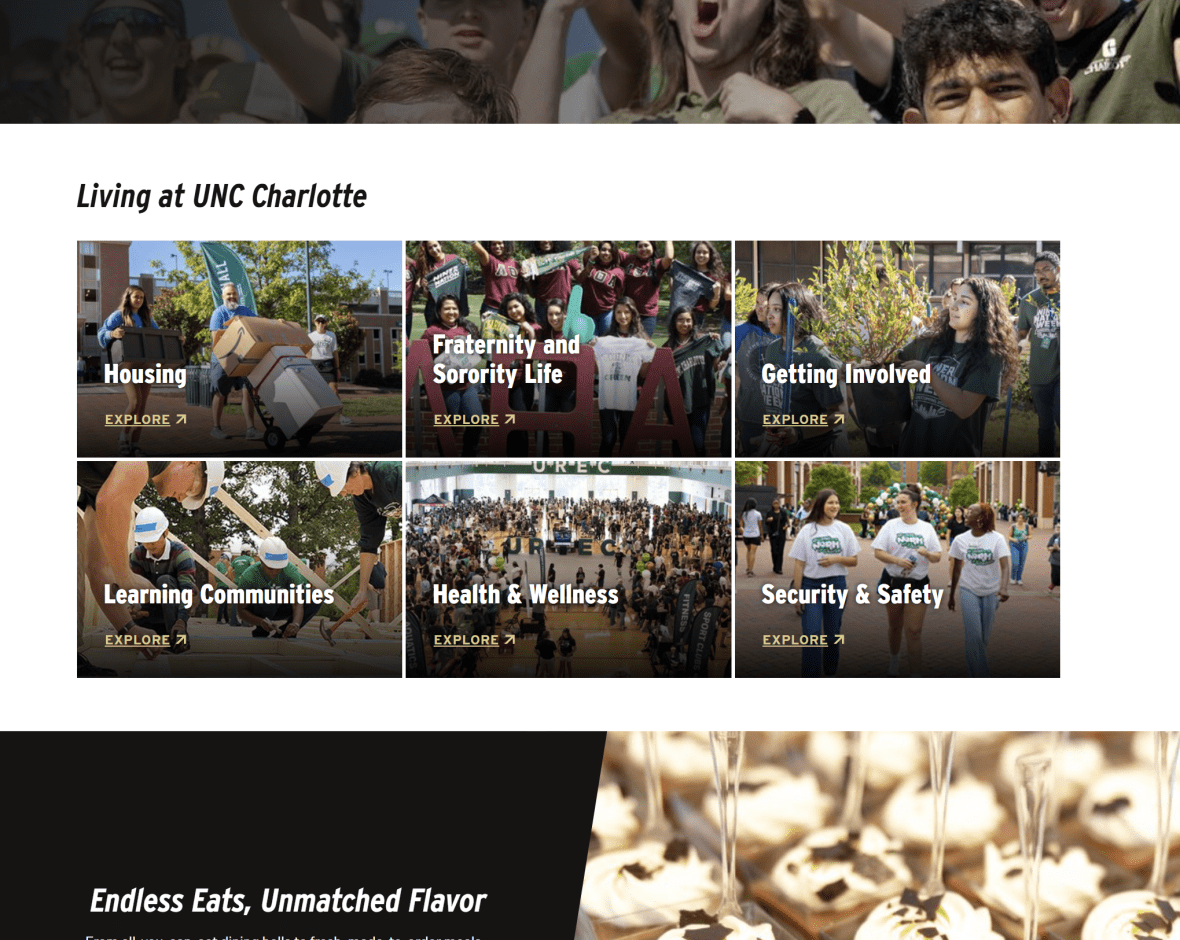
The Call to Action Grid allows users to display a grid of up to 16 CTA blocks on a page. Each block includes a title, a CTA button, and the option to include or exclude background graphics. The section component provides a way to add a section with a colored background, and it can include an optional header, description, and CTA button. This combination allows content creators to highlight multiple actions in a visually organized and customizable layout.
When To Use This Component
Use this component when you want to display between 2 and 16 links. It highlights these links on the page, giving them prominence while allowing them to be contextualized alongside related pages or resources. To maximize effectiveness, ensure that the links are meaningfully related, such as by topic, subject matter, or purpose.
USE CASES OR SCENARIOS
Link to departments within a college (ex. architecture, art & art history, dance, music)
Link to department-hosted programs listed on academics.charlotte.edu, ensuring each program directs to its designated program page.
Component Do’s & Don’ts
There might be a time when you don’t know whether to use a Call To Action Grid component or not. Here are some examples of how to effectively use a Call To Action Grid component and when you shouldn’t use one:
DO
Use this component to prominently display a set of thematically related links or CTAs. Keep titles short and clear, and ensure each CTA button communicates its intended action. If using background images, make sure they are relevant to the title to reinforce the message and provide meaningful visual context. Include alternative text (alt text) for images to support accessibility.
DON’T
Don’t overload the grid with too many CTA blocks, as this can overwhelm users. Avoid using long titles that may break the layout or reduce readability, and don’t include unrelated actions that could confuse visitors. Refrain from duplicating CTA blocks on the same page unnecessarily, and don’t rely solely on background graphics to convey meaning—ensure text and buttons remain clear. Do not reuse the same graphics. While up to 16 blocks are available, excessive use can clutter the page. If multiple categories or more than 16 blocks are needed, use the Link List component instead.
Component Design Options
Below are the Call to Action Grid component design options, with explanations of each and guidance on proper usage.
EDITABLE PARTS:
Block Heading:
Show Block Heading: Option to turn off or on the header.
Eyebrow Text (optional): An eyebrow text is a small line of text that appears above the title. Its purpose is to provide context, category information, or a subtle introduction to the main heading without drawing as much attention as the headline itself.
Title (optional): A header title should clearly convey the blocks main topic, be visually prominent, and guide visitors through the content while maintaining readability and accessibility.
Description (optional): The description provides a brief, clear summary that supports the header title and helps visitors quickly understand the block content.
Button (optional): The button prompts users to take a specific action. Its text should be short, clear, and compelling, and the linked URL must be correct and active to ensure users reach the intended destination.
Button Color: Green, Gold
Block Options:
Add Images: Option to turn off or on background images
Background Color: Gray, Black, White
Call To Action Grid Card:
Title: The title should clearly convey the block’s main topic. Keep titles concise, avoid Triple stacking and do not use long titles.
Link: The call-to-action (CTA) text prompts users to take a specific action. Its text should be short, clear, and compelling, and the linked URL must be correct and active to ensure users reach the intended destination.
Background Image: Incorporate relevant, high-quality graphics that reinforce the message, while maintaining visual balance between text and image for a polished, professional appearance.
The example below shows the Call To Action Grid in use, along with the selected configuration options.