Jump Links Menu
When to Use This Component
Use the Jump Links Menu Block on pages that are long or content-rich, where users may need to quickly navigate between multiple sections or headings. This component improves usability by keeping the page organized and allowing visitors to find specific information quickly. It is especially useful in the following situations:
USE CASES OR SCENARIOS
- You have a long page with multiple sections that users may want to navigate quickly.
- You want to improve the user experience by reducing scrolling and making information easier to find.
- Your page contains structured content, such as FAQs, guidelines, departmental information, or resource lists.
- You want to provide clear, on-page navigation that complements the main site menu without duplicating it.
Avoid using jump links on very short pages or pages with only one main section, as they would add unnecessary complexity.
Component Do’s and Don’ts
There might be a time when you don’t know whether to use a Jump Link Menu component or not. Here are some examples of how to effectively use a Jump Link Menu component and when you shouldn’t use one:
DO
Use clear, descriptive labels for each jump link so users know exactly what section they will jump to, and place the jump links menu at the top of the page or in a prominent location for easy access.
Ensure that headings and sections are properly structured so the anchor links function correctly, and test the links after publishing to confirm they scroll to the correct section.
Jump links should be used to enhance usability, particularly on pages where users may want to access specific information quickly.
DON’T
Don’t overload the menu with too many links, as this can overwhelm users, and avoid using jump links on very short pages where scrolling is minimal and the links add little value.
Do not link to sections that don’t exist or are hidden, and don’t rely solely on jump links for navigation—they should complement, not replace, the main site menu. Additionally, avoid using ambiguous link labels, since unclear text can frustrate users and make navigation less effective.
Avoid using a Jump Links Menu Block on the same page as a Child Menu Block, as this can create navigation redundancy and user confusion. While the Child Menu Block guides users through the site’s hierarchical page structure, jump links navigate within a single page, and having both on the same page can create competing navigation options that overwhelm users or make it unclear which menu to use to find content.
How To Use This Component
- Choose the section of the page you want users to navigate to. This can be a full content block, a heading, a paragraph, an image, or any other element. Be intentional with your selection to create a smoother, more intuitive user experience.
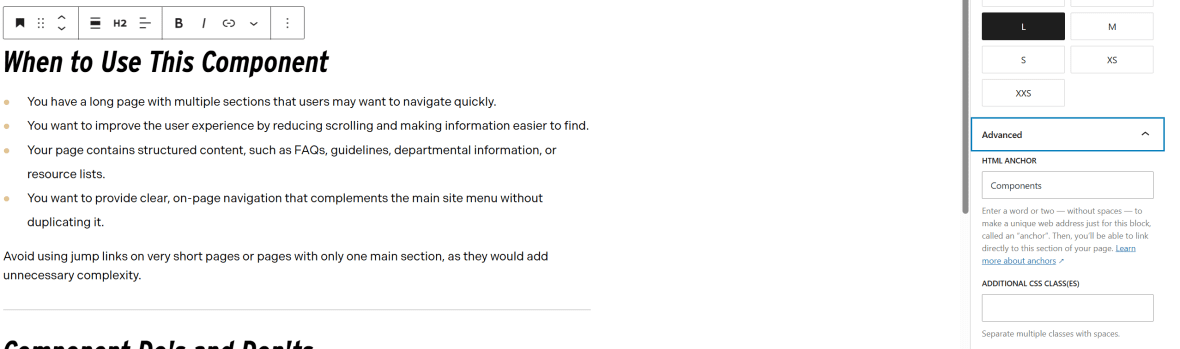
- In the Block Options panel on the right side, open the Advanced dropdown.
- In the HTML Anchor field, enter a short, unique identifier, one or two words with no spaces, to create your anchor link.
- Select the Jump Links Menu block.
- Click the Add Link button.
- In the Link Title field, enter a concise, descriptive label that clearly represents the section the link will jump to. Keep titles short and limited to a single line—avoid wrapping text onto a second line.
- In the HTML Anchor field, enter the same anchor keyword you created earlier.
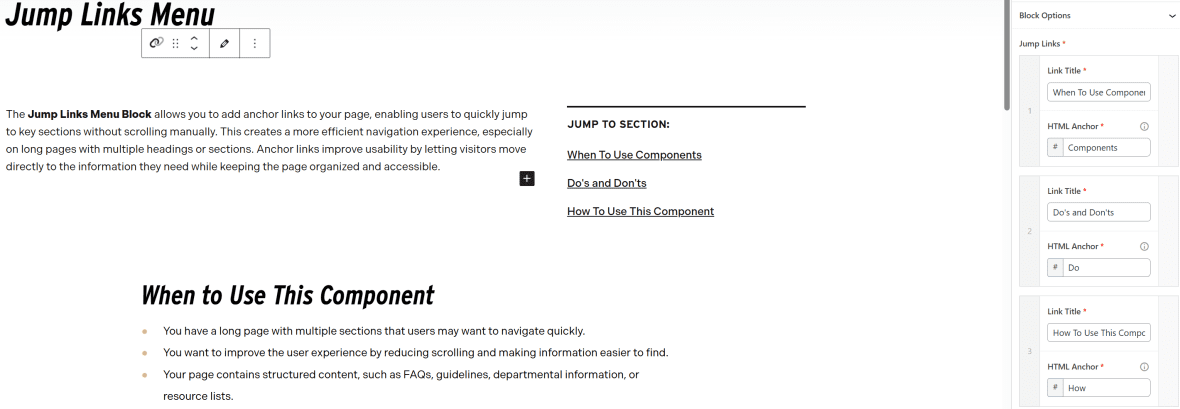
- Repeat the steps to add additional Jump Links.